Your Tally books, in your pocket — every feature
AccBrain puts the whole of your accounts on your phone: a live dashboard, who owes you and how late they are, 16+ reports, stock alerts, and the ability to raise an invoice, a receipt or a credit note from wherever you are. On the office computer it adds a set of analytics boards that open with Tally closed. Start on the free plan and stay there as long as it suits you. It reads your existing books — nothing in Tally changes, and nothing in how your team works has to.
Free to install · Android 8.0+ or iPhone on iOS 15+ · see pricing
- Report pack
- Full
- Language
- Your
- Team roles
- 4
- Free trial
- 7 days
Your whole business on one screen
Open the app and the numbers are already there — nothing to run, nothing to wait for.
The four numbers that matter
Cash and bank, money owed to you, money you owe and this month's sales — each with how it moved against last month.
A business health score
One score with the reasons behind it spelled out, and a direct action against every factor dragging it down.
Where the month's money went
Opening cash, money in, money out, where you stand now — the whole month as four bars.
A cash forecast
Your projected position week by week, built from the bills already on your books, so a squeeze is visible before it arrives.
Compare like for like
Sales and purchases for this month, last month and the same month a year ago, side by side.
One period, everywhere
Choose this month, this quarter, the financial year or your own dates once — the dashboard and every report follow it.
Every company you keep
Switch between all the companies in your books from the header; the app remembers which one you were in.
Know exactly who owes you — and chase them
Collections are the difference between a profitable month and an anxious one. AccBrain turns the chase into a two-minute routine.
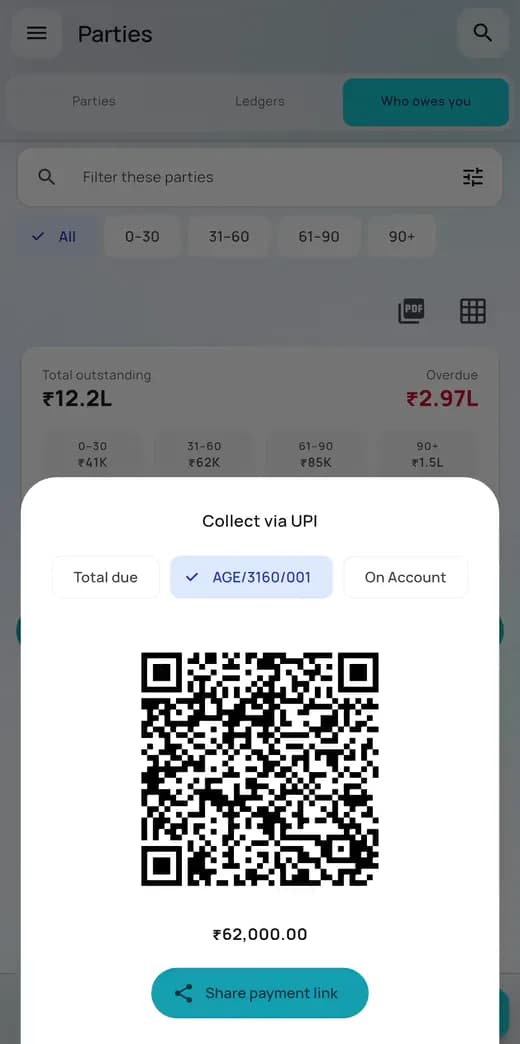
Ageing at a glance
Every customer with an open bill, bucketed 0–30, 31–60, 61–90 and over 90 days, worst first.
Bill-wise reminders you actually send
AccBrain writes the message — every open bill, its age, the total due — and opens WhatsApp or SMS with it ready. It goes from your own number, and you tap send.
Chase everyone in one sitting
Work down the overdue list one tap per customer, each row ticking off as its message opens, so nobody gets chased twice.
Collect on the spot with UPI
A QR for the whole balance, or for one bill — pick the bill and the code redraws for that amount, carrying its reference so the payment arrives already identified. The same link goes into the reminder message.
How fast each customer actually pays
“Typically settles in 12 days”, measured from the bills they have already paid — not a promise, a record. It sits on the row, so you know who to chase first.
A nudge on your schedule
Daily, weekly, monthly or off. It reminds you to chase — it never messages your customers on its own.
The money you owe, too
Payables get the same ageing treatment, so you can see what is due out before it catches you.
Every party and ledger, in your pocket
The balance you are about to be asked for, before you have finished walking to the desk.
Every customer and supplier
The party list with current balances, searchable, so a name and a number take one tap to find.
All your ledgers
When parties are not enough, the full ledger list is one sub-tab away.
One party, the whole picture
Balance, open bills and complete voucher history on a single screen.
Act without leaving
Raise a receipt, payment or invoice already filled in with the party you are looking at.
Every voucher, instantly findable
The day book and the full voucher list, filtered down to the one entry you are arguing about.
Vouchers and day book
Both views over the same books — a running list of what was recorded, in the order it happened.
Narrow it fast
Voucher-type chips and date presets, plus a search-and-filter bar that stays with you as you scroll.
The full voucher
Tap through for every accounting and inventory line exactly as it was entered.
One box, everything
Search parties, vouchers and stock together — and it copes with the many ways an Indian business name gets spelled.
Stock you can act on
Not just what you hold, but what has gone negative, what is running out and what has not moved in months.
Closing stock, item by item
Quantity and value for every stock item, with a search box and bounds for quantity and valuation.
Filter by storage location
Narrow the list to a single godown when you keep stock in more than one place.
Alerts worth acting on
Items that have gone negative, items below reorder level, and stock that simply is not moving.
Dead stock and ABC
Which items earn their shelf space, which contribute the revenue, and which are quietly tying up your cash.
16+ reports, ready the moment you open them
Grouped into money, inventory, health and compliance. No report to run and no export to wait for — every figure is already worked out. Profit & loss, the balance sheet and the tax summary are on the free plan.
Insights
Sales trend, cash and bank position, your biggest debtors and your fastest-moving items on one screen.
Profit & loss
Sales and other income less purchases and expenses, in plain words, with a twelve-month profit chart.
Balance sheet
What the business owns and what it owes, always as of today.
Tax summary
Rate-wise taxable value with HSN and commodity totals, outward and inward. Indicative — your filing stays in Tally.
Ageing
Who is late paying you and who you are late paying, with credit terms and a clear order to work in.
Order book
Orders taken and orders placed, against what has actually been billed — by party and by item, on both the sales and the purchase side.
Profitability
Which items, which customers and which stock groups actually make you money.
Cost centres
Performance by salesperson, branch or project — which part of the business is carrying the rest.
Stock intelligence
Dead stock, ABC contribution, movement class and velocity, as four views over one analysis.
Ratios
The ratio pack as it stands today, next to where it stood a year ago — including how many days of sales are sitting unpaid, and how long you take to pay your own suppliers.
Exceptions
An audit-style scan of the books for what looks wrong — duplicates, odd entries, a good customer who has quietly stopped buying, things worth a second look.
Compliance
Section 43B(h) MSME exposure and Section 194Q vendor turnover. Shown in India, where it applies.
Batch & expiry
Your stock by batch with the soonest expiry first, so what has to move this month is at the top of the list.
Cheque register
What the bank has not cleared yet and what is dated to present later — the gap between your balance and theirs.
Sales insights
What you are being charged more for, which customers came back, how the categories mix, and what sells alongside what.
Budget
Budget against actual on every ledger you have set one for, so an overspend shows up while the month can still be fixed.
Export to PDF and Excel
Most reports export both ways and go straight into the share sheet, so a statement reaches WhatsApp or email in two taps.
Names that render properly
Party names in Hindi, Bengali, Arabic and Urdu print as themselves in the PDFs, not as a row of empty boxes.
On the phone
Ask about your books in plain language
AccBrain AI answers the question you have not got a report for — and the times you would rather ask than go looking.
Ask in plain language
“Who owes me the most?”, “How were sales last quarter?”, “What is sitting in dead stock?” — typed the way you would ask a colleague.
Answers that match the screen
Every figure comes from your own books and agrees with the report that shows it, so you can act on it.
Charts and tables, not just prose
Answers come back as the shape that suits them — a table of debtors, a trend line, a summary card.
One tap to the detail
Follow-up buttons open the exact list the answer was about, already narrowed.
Find what was written on a voucher
Search by the narration and the description, not only by the number.
Ask it out loud
Tap the microphone and speak the question instead of typing it. The words land in the box for you to read before anything is sent.
Scan a bill, or raise an entry, from your phone
Photograph a supplier's bill and the purchase entry comes back filled in, ready to check and send — unlimited, with no per-invoice charge. Collected a cheque at the customer's office? Raise the receipt there, and stop carrying it around in your head.
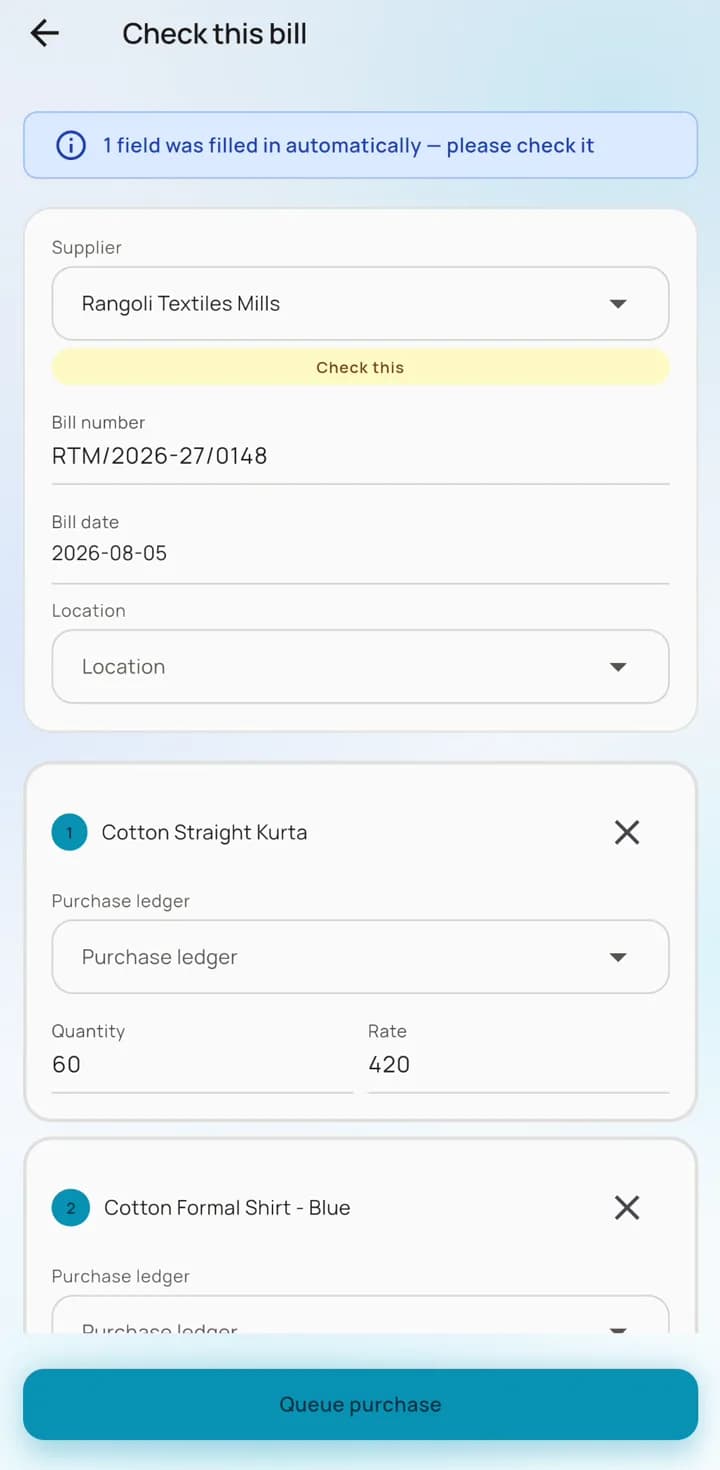
Photograph a supplier's bill
The entry comes back filled in — supplier, bill number, date, items, quantities and rates. You check it and send it.
It says what it guessed
Anything it was unsure of is filled in and flagged for you to confirm, so a guess is never mistaken for a reading.
Or type the bill in yourself
No photograph to take. The same purchase form opens empty for the bill that arrived as a text message, or the one you are reading down the phone.
A real sales invoice
Stock items, quantities, rates, tax lines and — when you keep stock in more than one place — the storage location.
Send any voucher as a PDF
Open a voucher and share it as an invoice-shaped PDF — into WhatsApp, into email, to the customer standing in front of you.
See what you sent
Every entry you raised with its current state, and the reason in full if one was rejected.
The entry lands in your books, not in a list somewhere
Most apps that let you type an invoice on a phone keep it on the phone. AccBrain posts it into Tally on the office computer as an ordinary voucher — same numbering series, same books, nobody retyping anything.
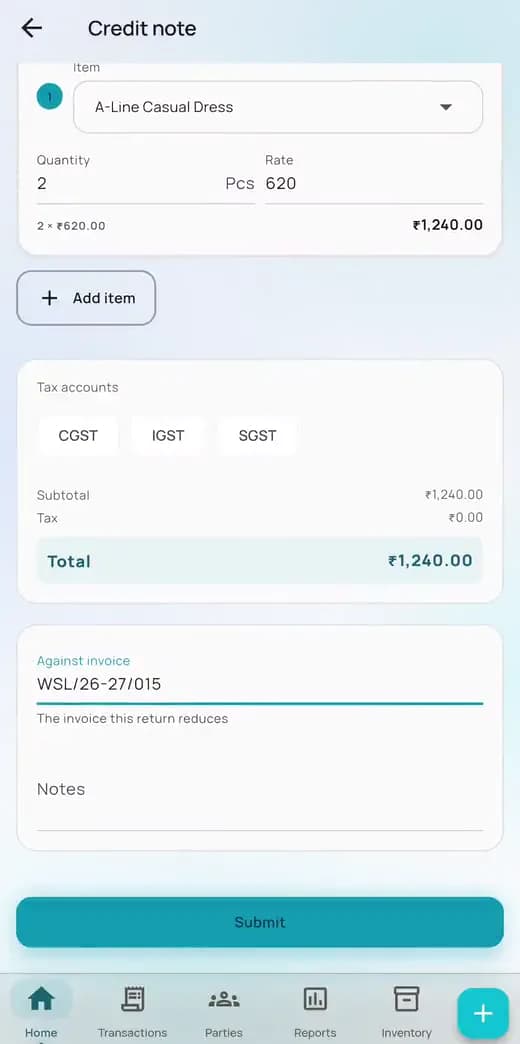
Quick add, wherever you are
One button reaches every form the app can raise, from any screen: invoice, receipt, payment, expense, purchase, stock transfer and the rest.
Credit and debit notes
A return against the invoice it reverses, on either side — the customer sending goods back, or you sending them back to a supplier.
Journals and contras
Any debit-and-credit pair, and cash-to-bank moves, for the people whose job that is. They appear in accountant mode and nowhere else.
Add a new customer on the spot
Create the party with its GSTIN, address and phone number while you are standing in front of them, and raise the invoice against it straight away.
Your numbering stays yours
Vouchers arrive in the series Tally already uses. Nothing is renumbered, and nothing lands in a separate holding area to be approved.
Only who you allow
Sales staff may raise invoices and collect receipts but never pay money out; journals and contras stay with the accountant. Viewers read only.
Free analytics on the computer Tally runs on
AccBrain for Windows is not only the bridge to your phone. Every install opens six boards of reporting on the PC itself — with Tally closed, without signing in, and without a plan. They answer the questions your accounting package has no report for.
Pulse
The morning view. Cash and bank, what is owed to you and by you, what is due to land this week, today against the same day last week — then a short list of what actually needs attention: overdue bills, parties over their limit, cheques about to present, entries that look duplicated.
Money
Collections in depth. Ageing on both sides, thirteen weeks of expected inflow, how your collection days have moved over two years, who genuinely pays late as opposed to who merely looks late, who is over their credit limit, and budget against actual.
Bank
What has not cleared, what is post-dated, what your books say, and what the bank should therefore be showing. The gap between the two, in one place, without a reconciliation exercise.
Stock
What to order, with a suggested quantity based on how fast it actually sells. Dead and slow-moving lines, turnover, value over time, batches by expiry date, and the split across your storage locations.
Sales
Every financial year on one axis, so a trend is a trend and not a hunch. The customers who really are your business, with a warning when too much of it rests on the top five. Category and tax-rate mix, sales going out below list price, suppliers whose prices have crept up, and what sells alongside what.
Audit
The questions worth asking before someone else does. Voucher numbers used twice, separate ledgers sharing a GSTIN, PAN or mobile, money that travels in a circle and comes back, entries written up long after their date, and dormant parties still holding a balance.
Every board exports to Excel
One click writes the full result — not the rows you happen to be looking at — and opens the folder it landed in.
It looks after itself
Sits in the system tray, starts with Windows, keeps itself current every few minutes, and never interrupts you to install something.
Your figures stay current
Changes in Tally come through as they are made, and the whole history is checked again overnight in case something was edited quietly.
It notices a deletion
A voucher removed in Tally stops counting here too — automatically, and on demand whenever you want to be certain the two agree.
Works with the office computer switched off
Your accounts should not stop being readable because you left the building.
A copy of your books lives on the phone, so balances, ledgers, stock and every report open at full speed with no signal — and with the computer running Tally switched off. Entries you raise offline queue and post themselves once you reconnect.
A daily digest, an overdue nudge, and a home-screen widget
Enough to keep you on top of it, quiet enough that you do not turn it off.
A daily digest
One notification a day: yesterday's sales and collections, plus what is currently overdue.
The overdue nudge
A prompt to go and chase, on the cadence you set — daily, weekly, monthly or never.
A weekly summary you can forward
Once a week, the week's figures arrive as a notification. Tap it and the summary opens as a PDF in the share sheet, ready for your accountant or your partner.
Home-screen widget
Cash and bank plus today's sales on your phone's home screen, without opening anything.
Controlled separately
The digest, the nudge and the weekly summary are independent, so muting one never silences the others.
Built for your role, your team and your language
An owner, an accountant and a warehouse manager do not want the same first screen — so they do not get one.
Three ways to use it
Owner, accountant or manager — each opens on what that job looks at first, in the words that job uses.
Four team roles
Owner and manager can do everything; sales staff may raise invoices and collect but never pay out; viewers read only. You invite and re-role people on the web dashboard.
Your team's languages
English, Hindi, Bengali, Spanish, Portuguese (Brazil), Arabic, Urdu and Indonesian — with Arabic and Urdu laid out right to left.
Your numbers, your tax words
Lakh and crore grouping where that is how you count, GST and HSN in India, VAT and HS code in the Gulf.
Light, dark or system
Pick a theme, or let the phone decide.
Locked behind your fingerprint
Optional biometric or PIN lock every time the app opens or comes back from the background.
Free to keep, or one purchase for the rest
Start free and stay free for as long as it suits you. A licence is one purchase covering one desktop and every phone your team carries.
The free plan is a working app
One company of up to 2,000 vouchers: the whole dashboard, the day book, profit & loss, the balance sheet and the tax summary with PDF and Excel export, the daily digest, the widget, and a few AI questions a month. It has no expiry date.
Try everything for seven days
A full seven-day trial of the paid product that starts when your books first arrive — no card, nothing to cancel, and the free plan is waiting underneath when it ends.
One licence, every phone
A licence covers one desktop computer and as many phones as your team carries. There is no device limit to manage.
Buy where it suits you
Through Google Play, the App Store or on this site — either way it lands on the same account, and buying again extends the time you already have.
Feature questions, answered
The things people ask before they install it.
Does AccBrain change anything in my Tally data?
No. AccBrain reads your books. The only things that go the other way are the entries you deliberately raise in the app — a sales invoice, receipt, payment, expense, purchase bill, credit or debit note, journal, contra, stock transfer, or a new party account — and they arrive as ordinary vouchers in your existing numbering series.
Does the app work without an internet connection?
Yes, for reading. Your books are held on the phone, so balances, parties, vouchers, stock and every report open with no signal. Raising a new entry needs a connection eventually, but you can fill it in offline and it goes through later.
Does the office computer have to be switched on?
Not to read. Everything already on your phone is available whether or not the computer running Tally is on. It needs to be on and running Tally for new entries to reach your books and for fresh figures to arrive.
Which phones are supported?
Android 8.0 or newer, and iPhone on iOS 15 or newer. The app is free to install from both Google Play and the App Store.
How many phones can use one licence?
As many as you like. A licence covers one desktop computer and an unlimited number of phones, so everyone on the team can have the app without buying anything extra.
Can I give my staff limited access?
Yes. There are four roles — owner, manager, sales and viewer. Sales staff can raise invoices and collect receipts but cannot pay money out, and viewers can only read. You manage the team from the web dashboard.
Can I export reports?
Most reports export to PDF and Excel and go straight into the share sheet, so they reach WhatsApp or email in a couple of taps. Party names in Hindi, Bengali, Arabic and Urdu render properly in the PDFs.
Does it handle GST?
There is a tax summary with rate-wise taxable value and HSN totals for both outward and inward supplies, and a compliance report covering 43B(h) and 194Q. It is there to show you where you stand — your filing still happens in Tally.
Can I use it for more than one company?
Yes, on a licence — every company in your books is available and switching between them takes one tap from the dashboard header. The free plan carries one company at a time.
Is there a free version?
Yes, and it does not expire. The free plan runs one company of up to 2,000 vouchers and gives you the entire dashboard, the day book with shareable voucher PDFs, profit & loss, the balance sheet and the tax summary with export, search, the daily digest and the widget — plus a few AI questions a month. Chasing receivables, the stock screens, the rest of the report pack, raising entries and bill scanning are what a licence adds.
Do I get anything on the computer, or only on the phone?
Both. AccBrain for Windows carries six analytics boards of its own — cash and collections, bank, stock, sales trends and an audit sweep — and they open on the PC with Tally closed, on every install, at no cost and without signing in. They are the answer for anyone who wants the reporting but does not want to work on a phone.
Still stuck? Ask us directly.
Put your books on your phone
Install the app, connect the computer your books live on, and the whole of this page is yours in about ten minutes.